

Administration in the app
The operator runs the server; the people who use Flux run their own company and its spaces. There is no server-wide administrator account: everything on this page is done in the app by the company’s owners and admins and by each space’s own admins, and the settings file is the operator’s only lever over the whole instance. This page describes Flux v0.2: one Flux is one company, with spaces.
The company and its spaces
Section titled “The company and its spaces”One Flux is one company. The first account, made from the setup link that ./flux up prints, sets it up and owns it, with the default space Everyone,
which holds the whole company. Everything else people do together happens in spaces: a space can be a
department, a team or a project. You see only the spaces you were added to, and the sidebar lists exactly
those. New › Space is one window: a name, the people (chosen from the company), an AI switch that starts
on, and Create space. You are the new space’s admin.
People and roles
Section titled “People and roles”Settings › Company holds the company’s name and its people.
| Role | Can |
|---|---|
| Owner | Everything an admin can do, and add or remove owners. |
| Admin | Add and remove people, change roles, change every space and delete any space except Everyone. |
| Member | Be in Everyone, start spaces and see the ones they are added to. |
| Guest | See only the spaces they are added to, and never have AI. |
Owners and admins add someone who already has an account with Add someone (by their email address), change a role, or remove a person. Anyone can Leave the company, except its last owner. Removing someone takes effect on their very next request; their own agents stop with them. Settings › Company lists people who left or were removed, with Restore: they sign in as usual and are in Everyone again, and other spaces are added by hand. Below that it lists every space, so an owner or admin can add themselves to one or delete it; their sidebar, search and Inbox hold only the spaces they belong to.


Settings › Company on a 1440 px computer and a 390 px phone, in the light and the dark theme your browser asks for.
Each space has its own settings (⋯ › Settings in its header): its name, its people, the AI switch, Leave space and, for its admins, Delete space…. A space has two roles, Member and Admin. Its creator is an admin and can make others admins. Deleting asks first, names the space and erases everything in it, including its conversations, tasks, Wiki pages and maps. Everyone cannot be deleted or left. The full rules are in the access policy.
Invite links
Section titled “Invite links”For someone who has no account yet, a company owner or admin chooses Invite with a link in Settings › Company. A link joins the company, and the person is then added to spaces from each space’s people. With single sign-on there are no links: everyone the provider lets in joins on their first sign-in.
- Joins as: member or guest, or admin when the creator is an owner. Never owner.
- Only for (optional): an email address. Empty means whoever opens the link first.
- Works for: 1, 7 or 30 days.
Flux copies the link; it sends no email itself, so send it yourself. The link works once. Pending
links are listed in the same place, where any owner or admin can copy or revoke them. The person
signs in, or creates an account from the link: an invite link always allows that, and it is the only way
to a password account after the owner’s (#1471). A link
for one address fills it in on the sign-up form and makes no account for another. With
single sign-on as the only way in there are no invite links. Changing
FLUX_AUTH_SECRET voids every pending link.
Reset links
Section titled “Reset links”Someone who forgot their password gets a reset link (#1471).
In Settings › Company, open the person’s role (Member ▾) and choose Make reset link: Flux copies a
one-time link, which you send yourself. An owner makes one for anyone else, an admin for members and guests.
./flux reset-link <email> on the server prints one for any account, the owner’s included, which is the way back
for an owner who forgot theirs. With email set up, Forgot password on the sign-in page mails the same kind of link.
A link works once and for FLUX_PASSWORD_RESET_TTL_SECONDS (one hour by default); a newer link for the same
person stops it, and using it stops the others and signs the person out everywhere. Changing the password in Settings stops no link. Each link is recorded with who made it and when; the token itself is
never stored. There are no reset links with single sign-on as the only way in.
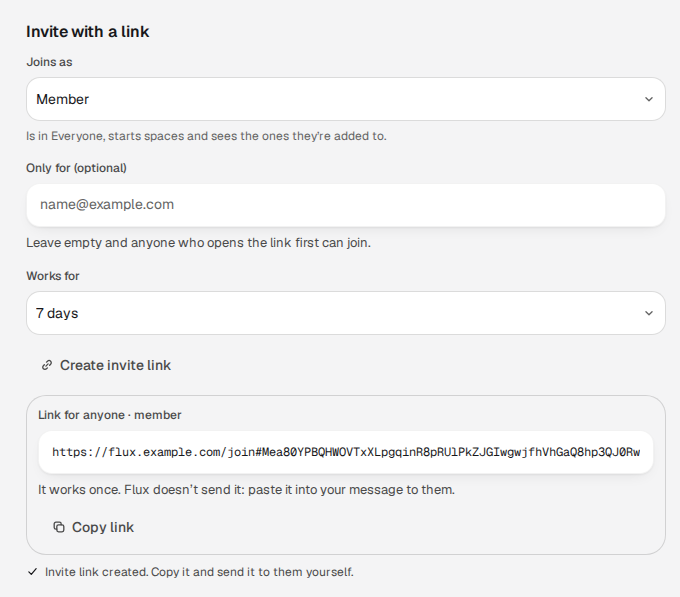
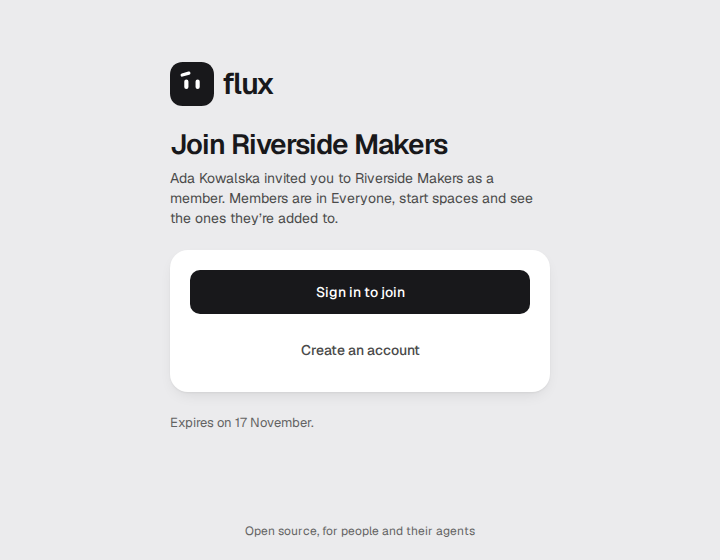
Creating the link in Settings › Company, and the page it opens for the person who receives it.
AI in a space
Section titled “AI in a space”Each space has an AI switch in its settings, on by default. Its admins, and the company’s owners and admins, turn it off or on for that space. There is no switch for the whole Flux:
- Off: no agent, no
/aiand no connected MCP client reads or acts in the space, including each member’s own./aianswers “AI is off in this space” and the Owner picker lists people only. Work an agent had started stops before its next change. People keep working as before. - On again: agents and connected clients can work there again with the access they had. Nothing that was stopped starts again by itself.
A guest never has AI, and an encrypted space never has AI and shows no switch. The settings that decide whether AI can run at all on this server are the operator’s (AI providers, the agent runtime); the space switch can only narrow them. The contract is AI in a space.
Encrypted spaces
Section titled “Encrypted spaces”Anyone in the company who is not a guest can make a space Encrypted in the New space window (the switch is off by default and cannot be turned off later). Its content is encrypted on the server, AI is always off there, and after every server restart the space waits until one of its admins enters their own unlock password; its members see “Locked, waiting for an admin”, and the rest of the company works as usual. The person making it chooses an unlock password and downloads a recovery code before Create. Only the space’s admins and the recovery code hold the keys. A company owner or admin sees the space listed in Settings → Company and can delete it, but cannot open it and has no Add me for it. If every password and the recovery code are lost, nobody can recover the space, the operator included. What the operator does is in operating encrypted spaces.
Agents and connections
Section titled “Agents and connections”In v0.2 everything that works for a person with AI is an agent, and each person connects AI once. Settings › AI is where each person (not a guest) does it, and there is nothing for an admin to set up per person:
- Connect AI. A person adds an API key (Anthropic, OpenAI, OpenRouter, Gemini or an OpenAI-compatible
endpoint) and, when the operator has switched the agent runtime on, signs in with their
own Claude plan (Claude Code) or ChatGPT plan (Codex). Agents on an API key run in the same runtime (as pi), which the operator turns on with
pi. They can hold several at once. Each shows one usage line. Flux sets no limits of its own: a plan at its limit pauses the agent until the reset, and an API key has the one daily budget its owner sets. Nothing switches to another connection by itself. Connections belong to one person and are never shared with the company. - Agents. A person gets Assistant when they connect AI, can add more (a Planner, a Reviewer), and gives each its
own instructions, model (from any of their connections) and memory. Each agent is a private chat in Messages.
/aiin any conversation asks the Assistant, and only the asker sees the answer until they choose Show everyone. A person can give a task to one of their own agents in its Owner field, and can tell an agent to do something on a schedule (“every weekday at 9, summarise what changed”). Only the owner prompts, configures or pays for an agent. - An agent has exactly its owner’s rights. There are no agent grants and no access requests: it reads and changes what its owner can, right now, only in spaces where AI is on, and it loses access the moment its owner does. A company owner’s or admin’s agents see only the spaces that person was added to. Each agent has one switch, Ask me first: off (the default) it does the work and tells its owner, with Undo; on, every change waits for the owner’s OK. Deleting anything and changing other people’s things always wait for the owner’s OK, which only the owner can give, in their own signed-in session. Every change has an Undo on the agent’s message.
- Local clients. A person connects their own Claude Code, Codex or another MCP client to Flux with the commands on the connect page (Settings › AI › Connect AI › Connect another › Claude Code or Codex on your computer, then Show the command) and one click on Allow. It acts with the person’s rights, has the same Ask me first switch, and Disconnect ends it at once. Nobody can make a connection on someone else’s behalf. Connect your own agent walks through it, and the integration guide is for people who build clients.
- The web. A server agent searches the web and reads public pages as much as a question needs, and lists every address it
used. This is on by default and the operator can turn it off with
FLUX_WEB_READS=off(why you might).
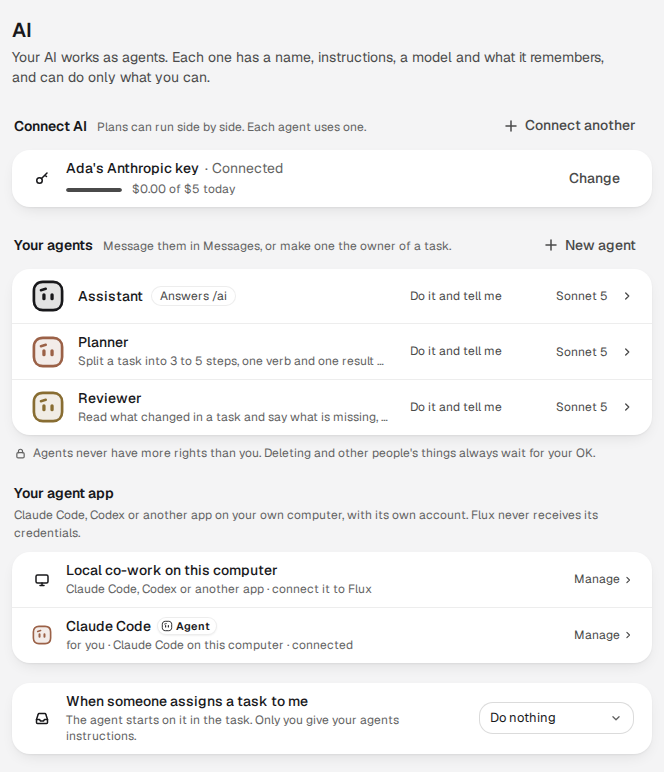
Settings › AI of one person: a connection, their agents and their own Claude Code, connected.
What the operator decides, in the settings file: FLUX_PERSONAL_RUNS and a key file for
agents on API keys, the agent runtime for Claude and ChatGPT plans, and FLUX_WEB_READS. AI works right after
install (#1438): ./flux up makes the key file and turns agents on API keys on, so each person, the owner first, connects AI in
Settings › AI without editing a file. An operator who wants no AI sets FLUX_PERSONAL_RUNS=off; Settings › AI then says “Off on
this Flux server” and offers only the person’s own Claude Code or Codex, and nobody is told to ask anyone. The full model is in
agents: everything is an agent.
Personal settings
Section titled “Personal settings”Each person manages their own Account (name, email, password and signed-in sessions, which they can end), Appearance (light, dark or system, and Kreska’s face; text size and reduced motion follow the system), Notifications (what reaches the Inbox, push and email, quiet hours) and Keyboard shortcuts. On a computer, Settings opens from your name at the bottom left → All settings.
What only the operator can do
Section titled “What only the operator can do”| Task | How |
|---|---|
| The owner’s first account | The setup link ./flux up prints (FLUX_SETUP_TOKEN); later accounts come from invite links or single sign-on |
| A reset link for any account, the owner’s too | ./flux reset-link <email> (reset links) |
| Email, push, link cards, live editing | The configuration reference |
| Whether people can connect an API key or a Claude or ChatGPT plan, and whether agents use the web | AI providers, agent runtime |
| Recover a person’s single sign-on link | ./flux identity link / unlink (single sign-on) |
| Export a space as files | ./flux export (project export); a space’s admins can also export from the app |
| Backups, restores, upgrades | Backup and restore, upgrade |